SET UP. MEASURE. BUILD.
The Almighty Ruler® Quick Start Guide
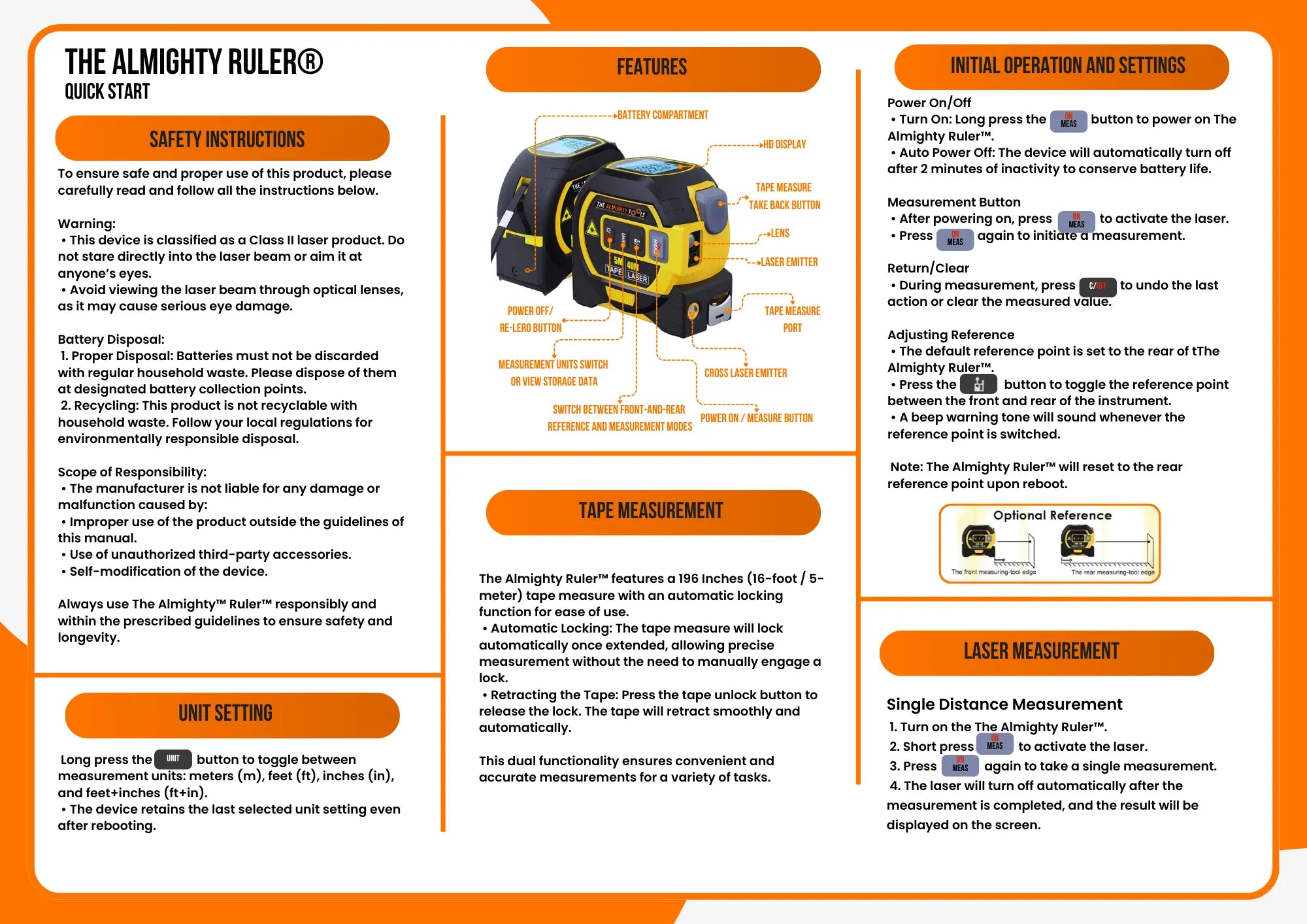
Get started with your 3-in-1 tape measure, laser distance measurer and cross-line laser. Follow the steps below for everyday measurements, room calculations and alignment.
Use only regular, non-rechargeable 1.5 V AAA / LR03 batteries. We recommend alkaline AAA batteries. Do not use rechargeable batteries: the device will not start with them.
Watch the video tutorial
Watch the original English tutorial, then follow the written steps below.
Before you start
This is a Class II laser device. Never look directly into the laser beam or point it at anyone’s eyes. Do not view the beam through optical lenses.
Use the device within its operating temperature range. Dispose of batteries at a designated collection point and follow local rules for disposal of the device.
Your first measurement
- Install the batteries. Open the battery compartment, insert two regular, non-rechargeable 1.5 V AAA / LR03 batteries with the polarity shown inside, then close and secure the cover.
- Turn it on. Long-press ON/MEAS to power on the device.
- Choose your units. Long-press UNIT to cycle through meters (m), feet (ft), inches (in) and feet plus inches (ft+in). The device remembers your last selection.
- Check the reference point. The rear edge is the default starting point. Confirm the front/rear reference indicator on the display matches the edge you are measuring from.
- Aim and measure. Briefly press ON/MEAS to activate the distance laser. Aim at the target, then press ON/MEAS again to take the reading. The distance appears on the display and the laser switches off.
For a first test, use a light-colored indoor wall. Strong sunlight, dark surfaces and temperature changes can affect the signal and accuracy.
Buttons & display
- ON/MEAS
- Long-press to power on. Briefly press to activate the laser or take a measurement. Hold for 3 seconds for continuous measurement, or 5 seconds for the cross-line laser.
- C/OFF
- Clear the displayed value or undo the last measurement action. This is also the power-off control.
- UNIT
- Long-press to change units. Briefly press to open measurement history, then press again to scroll through saved readings.
- Mode / reference button
- The button with the reference icon selects measurement modes and the front/rear reference. Check the display icon after making a selection; a beep confirms a reference change. The reference returns to the rear edge after restarting.
- Tape release button
- Release the automatically locked tape so it can retract.
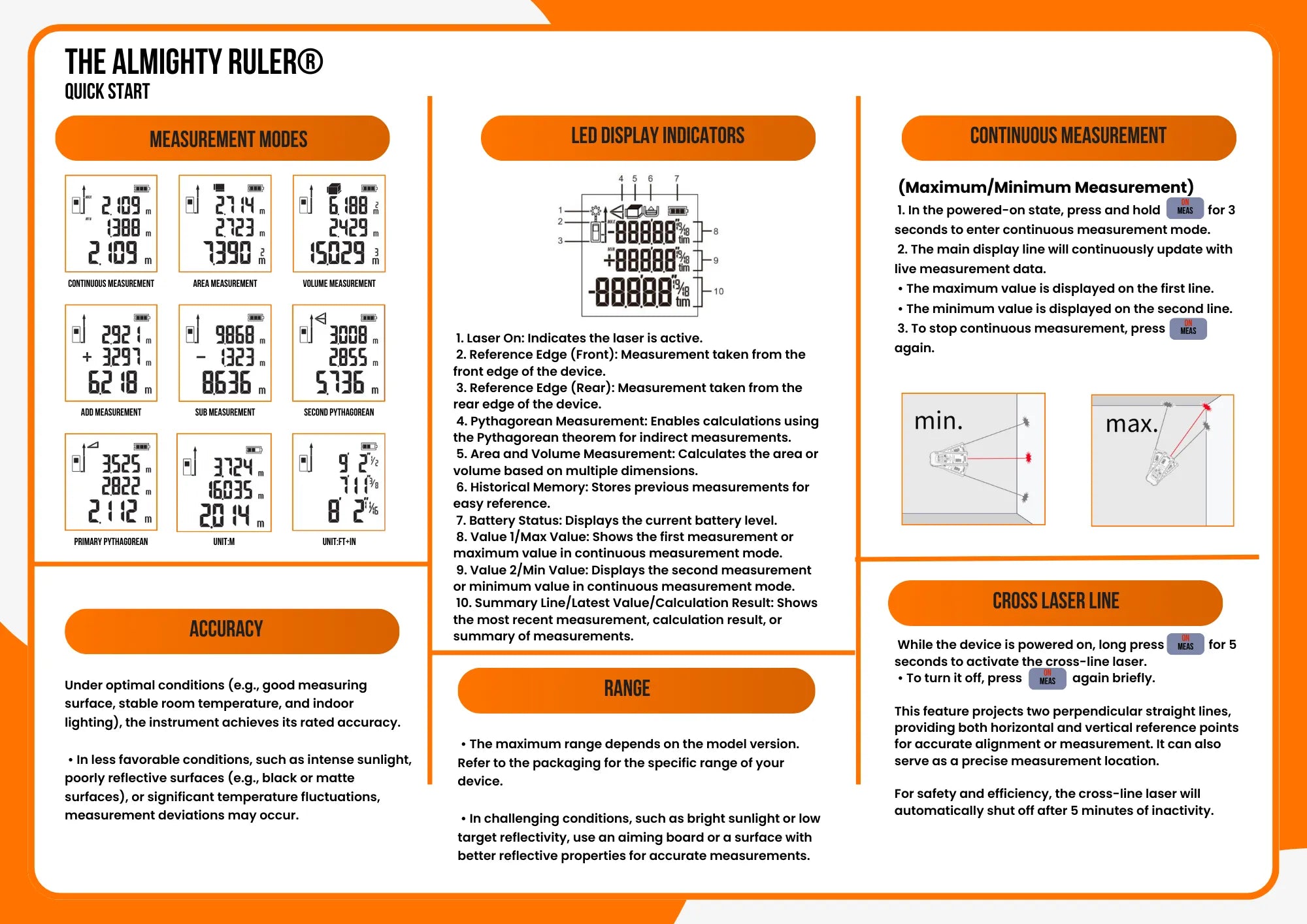
The main display line shows the latest measurement or calculated result. In continuous mode, the upper lines show the maximum and minimum readings. Other icons show laser activity, the reference edge, the selected mode, memory and battery level.
Using the tape measure
- Pull out the tape to the length you need. It locks automatically.
- Read the measurement from the markings on the tape blade.
- Press the tape release button to retract the blade, keeping your fingers clear.
The physical tape is 5 m / 16 ft long. Its measurement is read from the blade; the screen displays laser measurements and calculations.
Measurement modes
The mode-button counts below start from normal single-distance mode. Confirm the matching symbol on the display before measuring.
Continuous distance (max/min)
With the device on, hold ON/MEAS for 3 seconds. Move the device to track the current distance, maximum and minimum readings. Briefly press ON/MEAS again to stop.
Add or subtract distances
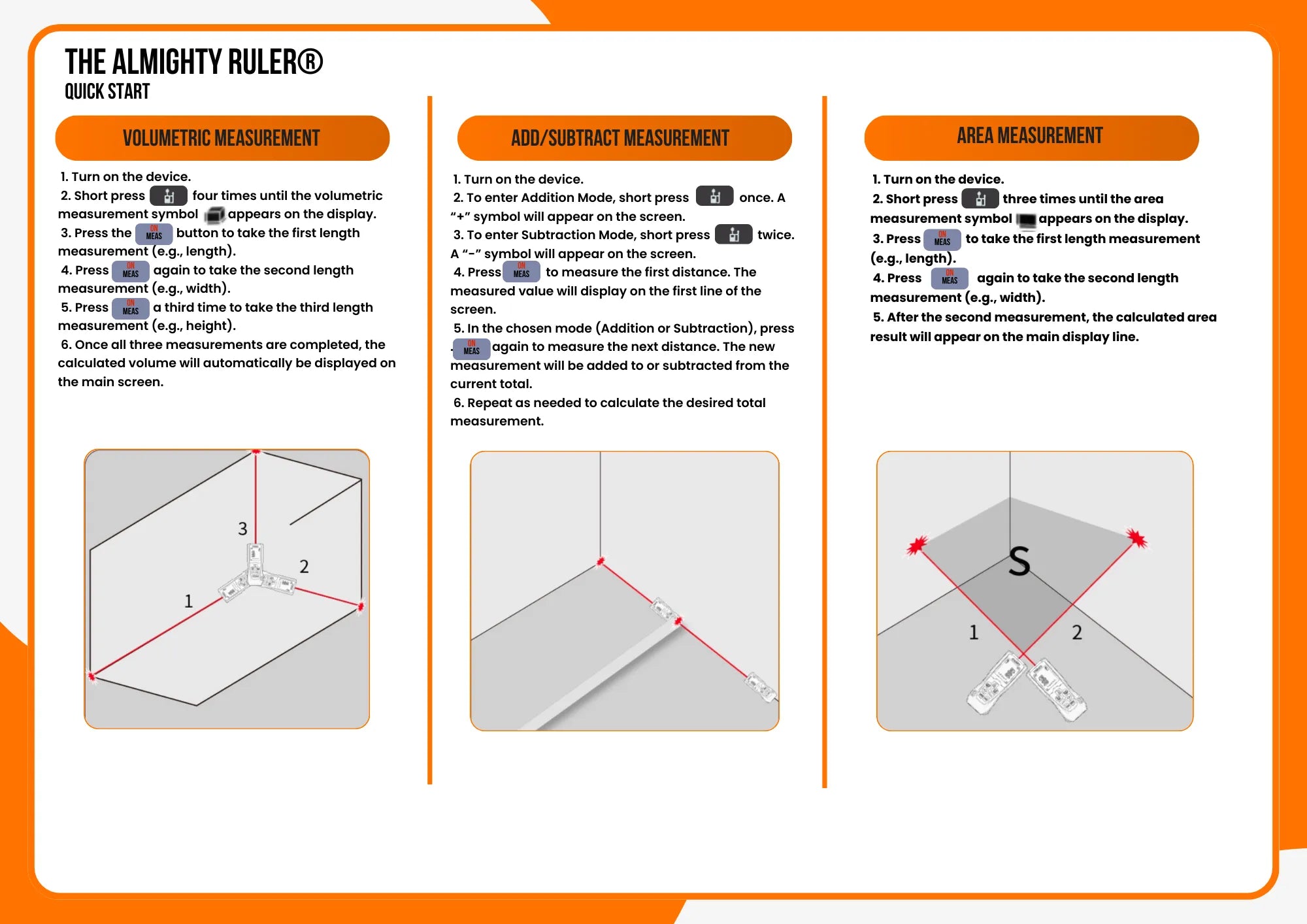
Press the mode button once for addition (+) or twice for subtraction (−). Take the first reading with ON/MEAS. Each following measurement is added to or subtracted from the running total.
Area
Press the mode button three times until the area symbol appears. Measure the length, then the width with ON/MEAS. The calculated area appears on the main display line.
Volume
Press the mode button four times until the volume symbol appears. Measure length, width and height with ON/MEAS. The device calculates the volume after the third reading.
Indirect height: two measurements
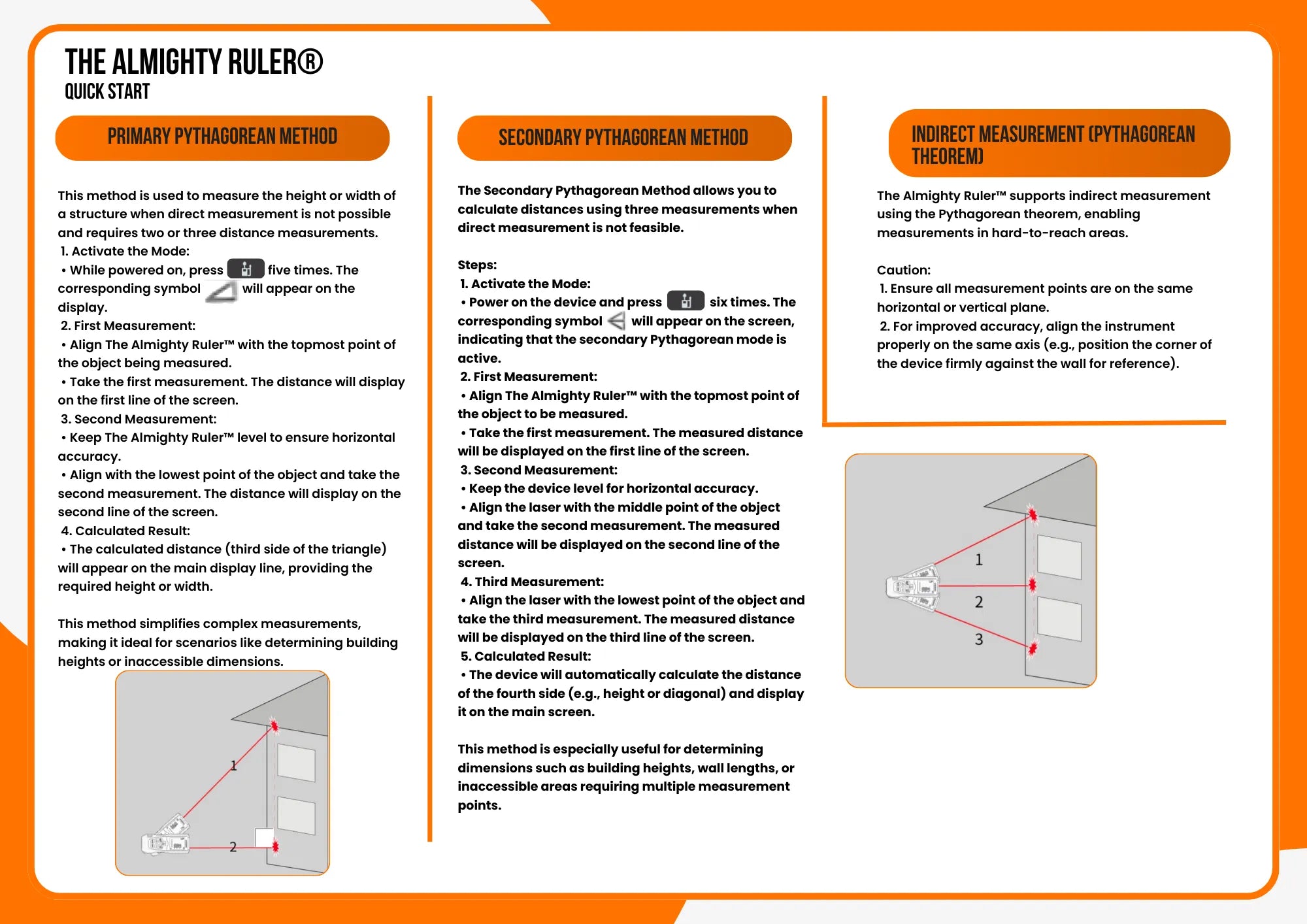
Press the mode button five times for the primary Pythagorean mode (triangle symbol). Keep the device at one fixed position throughout the sequence.
- Aim at the top of the object and measure the diagonal distance.
- Keep the device level and measure the horizontal distance to the object.
- Read the calculated height on the main display line.
Indirect height: three measurements
Press the mode button six times for the secondary Pythagorean mode. From the same fixed position, measure the top diagonal, the middle horizontal distance and the bottom diagonal in that order. The calculated height appears after the third reading.
For indirect measurements, keep all target points in the same vertical plane and the middle measurement horizontal. See the original illustrated manual below for the measurement diagrams.
Cross-line laser
With the device on, hold ON/MEAS for 5 seconds to project two perpendicular laser lines for alignment. Briefly press ON/MEAS to switch them off. The cross-line laser switches off automatically after 5 minutes of inactivity.
Measurement history
Briefly press UNIT once to open history. Press UNIT again to scroll through the last 20 measured or calculated results, starting with the most recent.
Troubleshooting
If the device will not turn on
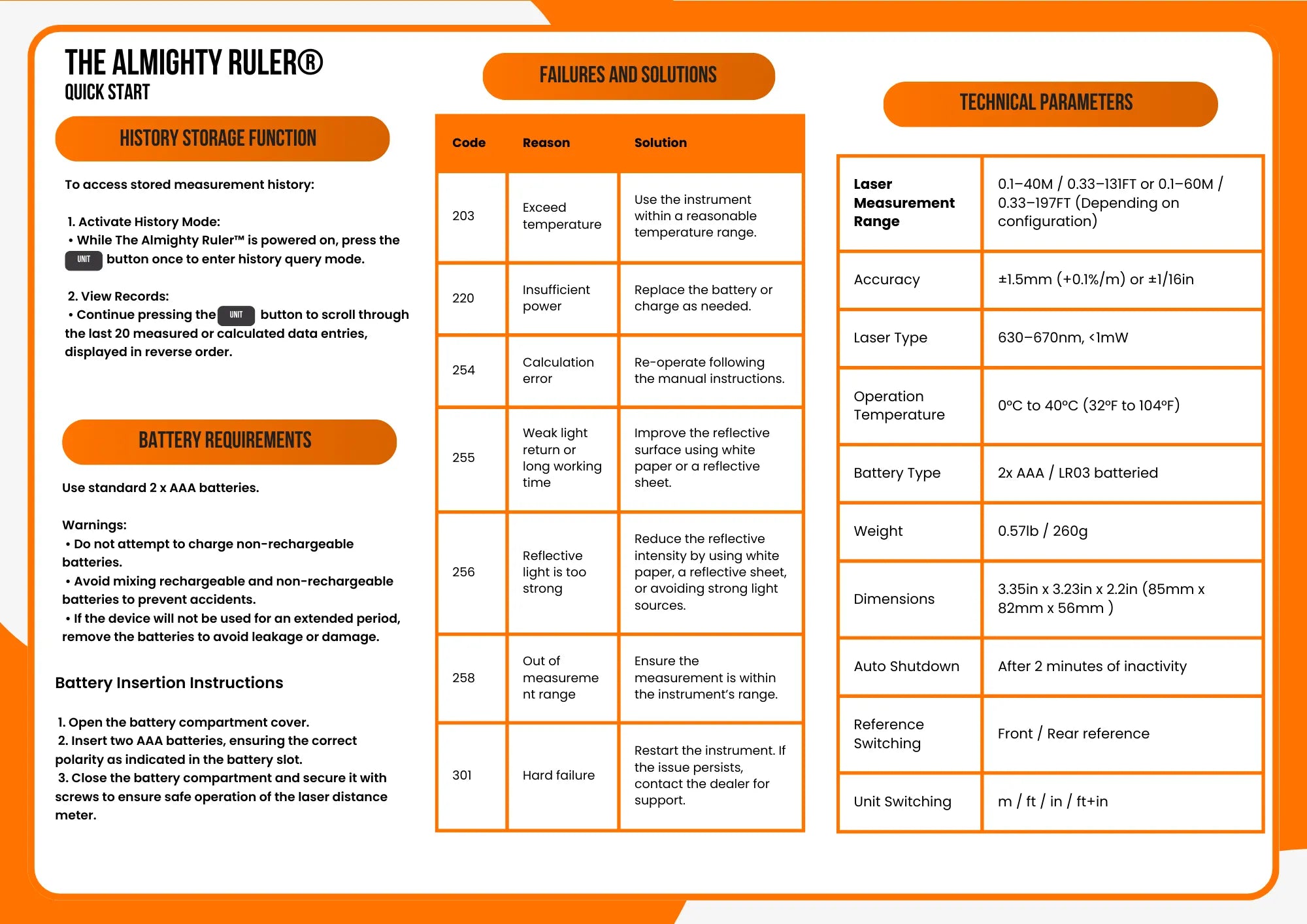
Use two regular, non-rechargeable 1.5 V AAA / LR03 batteries. Rechargeable batteries will not start the device. Check their polarity and secure the battery cover, then long-press ON/MEAS. Never recharge disposable batteries. Remove them before long-term storage.
If a reading looks wrong
Check the front/rear reference indicator first. Try another measurement indoors on a light-colored target, within your model’s range. Strong sunlight and weak or excessive reflected light can interfere with the laser.
| Code | Meaning | What to do |
|---|---|---|
| 203 | Temperature outside the operating range | Use the device between 0–40 °C (32–104 °F). |
| 220 | Low battery power | Replace the two AAA batteries and check their polarity. |
| 254 | Calculation error | Repeat the measurements in the correct order for the selected mode. |
| 255 | Weak reflected signal | Try a lighter target or a sheet of white paper on the target surface. |
| 256 | Reflected signal too strong | Reduce glare and direct light; try a sheet of white paper on the target. |
| 258 | Distance outside the measuring range | Move the target within the rated range of your version. |
| 301 | Hardware fault | Restart the device. If the error continues, contact support. |
Still need help? Contact our support team with your model, the error code and a short description of what happens.
Specifications
The original manual covers both 40 m and 60 m versions. Use the range printed on your own unit or packaging.
| Laser distance range | 0.1–40 m (0.33–131 ft) or 0.1–60 m (0.33–197 ft), depending on your version |
|---|---|
| Tape measure | 5 m / 16 ft, with automatic locking |
| Laser accuracy | ±1.5 mm (±1/16 in) under good measuring conditions |
| Laser type | Class II; 630–670 nm; less than 1 mW |
| Power supply | 2 × regular, non-rechargeable 1.5 V AAA / LR03 batteries |
| Operating temperature | 0–40 °C (32–104 °F) |
| Saved measurements | Last 20 measurements or calculated results |
| Automatic power-off | After 2 minutes of inactivity |
| Weight | 260 g (0.57 lb) |
| Dimensions | 85 × 82 × 56 mm (3.35 × 3.23 × 2.2 in) |
Original illustrated manual
Keep the original English sheets handy for the button diagram, display symbols and indirect-measurement diagrams.